

Website Redesign Strategy: When to Do It, How to Execute, and What to Measure
Most website redesigns fail to move the business needle because they prioritize looks over strategy. From UX psychology to CMS selection, budget realities to migration pitfalls, this is the complete website redesign strategy playbook for business leaders who can’t afford to get it wrong.
Redesign with Intent, Not Just Aesthetics
Here’s a number that should give any business leader pause: research from Forrester and various CRO studies consistently shows that a significant portion of website redesigns fail to improve core business metrics within the first year. Teams invest months of effort and tens of thousands of dollars, launch a beautiful new site, and then watch their organic traffic crater and conversion rates stagnate.
The culprit is almost always the same. The redesign was driven by aesthetics, not strategy.
A new color palette and a modern layout are not a growth plan. A website redesign is a capital investment, and like any capital investment, it needs a clear thesis, disciplined execution, and measurable outcomes. This article covers exactly that: how to know when a full redesign is the right call (versus a smarter, cheaper alternative), how to protect your SEO rankings during the transition, and which metrics actually tell you whether the investment worked.
When It’s Actually Time to Redesign
Not every problem requires a full redesign. Understanding the difference saves you time, money, and a lot of unnecessary disruption.
 Signs a Full Redesign Is Warranted
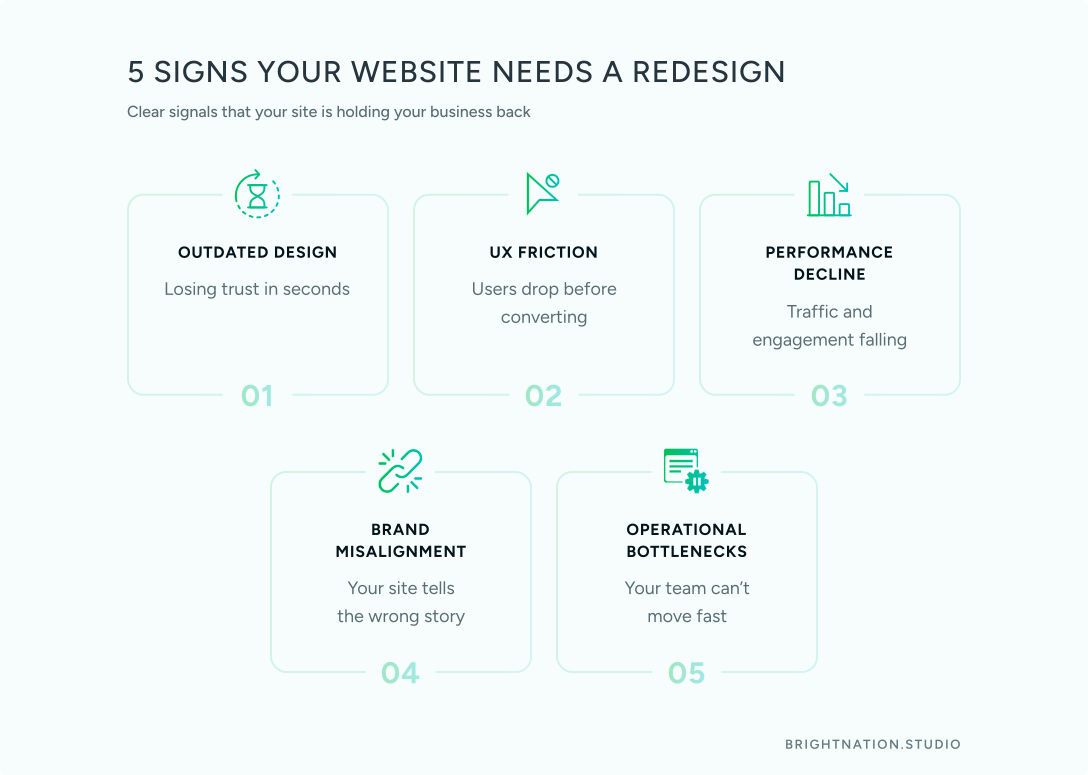
Outdated aesthetics that undercut trust. Users form a first impression of your site in roughly 50 milliseconds. If your site looks like it was built five years ago, visitors make an immediate judgment about your brand’s credibility. If competitors look sharper, you’re losing business before a single word is read.
UX friction that blocks conversions. Slow page speeds, a broken mobile experience, confusing navigation, and buried calls-to-action are not cosmetic problems. Google’s research shows that as page load time increases from one to three seconds, the probability of a mobile user bouncing increases by 32%. These are revenue problems.
Declining performance metrics. If organic traffic has been trending down for two or more quarters, bounce rates are climbing, and your pages-per-session numbers are falling, the site is actively working against your business goals.
Brand evolution without a corresponding digital presence. You’ve expanded your services, repositioned in the market, or updated your brand identity. The site still tells the old story. That misalignment erodes trust and confuses prospects.
Operational bottlenecks. If your marketing team needs a developer to change a headline or swap an image, your CMS is a liability. That friction slows campaigns, delays testing, and creates a dependency that costs you agility.
 When NOT to Redesign
If your core structure is sound but conversion rates are underperforming, a CRO (Conversion Rate Optimization) project is often faster and cheaper than a full rebuild. A/B testing landing pages, refining CTAs, and improving form flows can deliver significant lift without the disruption of a complete overhaul.
Similarly, if the design feels dated but the architecture and content are solid, a visual refresh (updated typography, new imagery, refined color system) may be all you need.
Know what problem you’re actually solving before you commit to a full redesign.
The SEO Migration Trap Nobody Warns You About
This is the most expensive mistake in website redesign, and it’s shockingly common. Companies complete a beautiful new site, hit publish, and then spend the next six months watching their organic traffic fall off a cliff.
Poor redesign execution can cause traffic losses of 20% to 60% in the months following launch. For a business that relies on inbound leads, that’s a serious revenue event.
The mechanism is straightforward. Search engines have indexed your existing URLs, assigned authority to your pages, and built a map of your site’s structure. When you redesign without protecting that structure, you break the map. Google sees hundreds of dead pages, misses the signals it relied on, and re-evaluates your rankings from scratch.
A real-world example: a mid-size B2B software company redesigned their site, changed their URL structure to match a new information architecture, and launched without implementing 301 redirects. Within 60 days, they lost 47% of their organic traffic. Recovery took nearly eight months.
How to Protect Your Rankings
Crawl and map your existing site before a single design file is opened. Document every URL, its traffic volume, and its inbound links.
Preserve your URL structure wherever possible. If a page ranks well at /services/web-design, keep that URL. Don’t change it to /what-we-do/web-design without a compelling reason.
Implement 301 redirects for every changed URL. Every single one. This transfers ranking authority from old URLs to new ones.
Run a pre-launch SEO audit on the staging environment. Check for broken internal links, missing meta titles, unoptimized heading structures, and Core Web Vitals scores.
Submit an updated sitemap to Google Search Console immediately after launch and monitor crawl errors daily for the first 30 days.
SEO migration is not a post-launch task. It is a pre-launch requirement.
Strategic Questions to Answer Before You Start
The quality of your redesign outcome is directly proportional to the quality of your pre-project thinking. Before any wireframe is sketched, your team needs clear answers to these questions.
1. What is the North Star goal? Is this redesign meant to generate leads, establish thought leadership, drive direct sales, or reduce support burden? One primary goal, not five.
2. Who is the user and what do they need? Not who you think they are. Who they actually are, based on interviews, session recordings, and analytics data. What task are they trying to complete? Where do they get confused or drop off?
3. Where is the current site failing? Pull your analytics before the redesign begins. Which pages have the highest exit rates? Where are users dropping out of your conversion funnel? This data shapes your priorities.
4. How should the brand show up? Voice, visual identity, and tone of communication need to be defined before design begins, not during it.
5. What does success look like at six months? Define your KPIs now. Organic traffic growth, conversion rate improvement, lead volume, Core Web Vitals scores. If you can’t measure it, you can’t manage it.
6. What is the realistic budget and timeline? Set honest expectations. Rushed redesigns create technical debt. Underbudgeted projects cut corners that hurt performance.
Choosing Your CMS and Tech Stack
The platform your site runs on shapes what your team can do with it, how fast it performs, and how easily it scales.
Traditional CMS platforms like WordPress offer a familiar interface, a large ecosystem of plugins, and strong community support. For most small and mid-size businesses, a well-built WordPress site managed by an experienced developer is a solid choice. The key word is well-built. A bloated WordPress installation with 40 plugins is a performance and security liability.
Headless CMS architecture decouples the content management layer from the front-end presentation layer. This gives developers more control over performance and allows content to be delivered across multiple channels (web, app, digital signage) from a single source. It’s the right choice for businesses with complex content needs, high performance requirements, or multi-channel distribution. It requires more technical expertise to manage.
Budget and Timeline: The Honest Picture
A website redesign follows a predictable lifecycle: Discovery, Design, Development, QA, Launch. Each phase requires time and cannot be safely compressed without consequences.
Timeline expectations by business size:
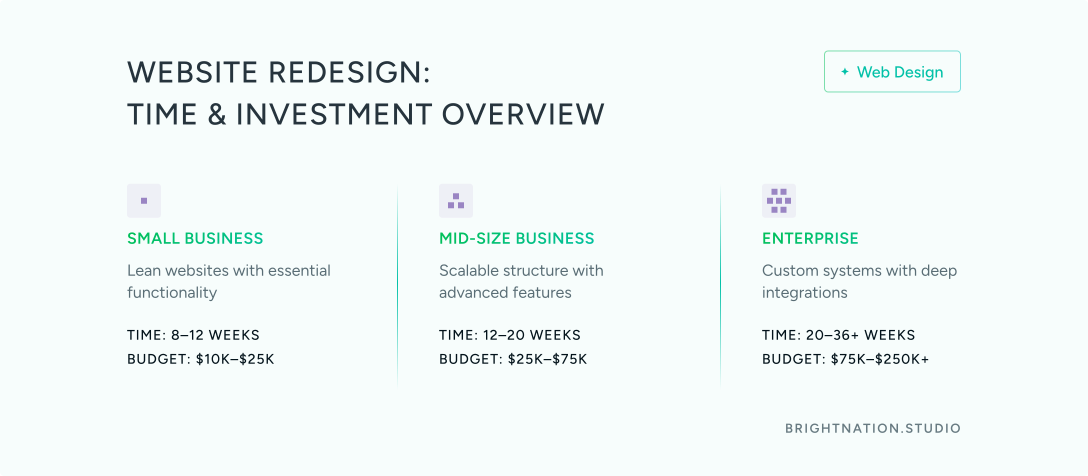
Small business site (5-10 pages): 8-12 weeks
Mid-size business site (12-25 pages): 12-20 weeks
Enterprise or complex platform: 20-36+ weeks
Rushed timelines produce sites with inadequate testing, poor mobile optimization, and unresolved technical issues. These cost more to fix after launch than they would have cost to prevent.
Budget ranges (approximate, varies by scope and agency):
Small business redesign: $10,000-$25,000
Mid-size business redesign: $25,000-$75,000
Enterprise-level redesign: $75,000-$250,000+
Hidden costs to plan for: Copywriting, photography, SEO migration work, accessibility audits, post-launch support, and staff training on the new CMS. These are not optional line items. They are part of the investment.
The Metrics That Prove Your Redesign Worked
Set your measurement framework before launch. Establish baseline numbers from your current site so you have something to compare against.
Engagement metrics: Bounce rate, average time on page, pages per session. These tell you whether the new site is holding attention and guiding users deeper into the experience.
SEO metrics: Organic traffic volume, keyword rankings, Core Web Vitals scores (Largest Contentful Paint, Cumulative Layout Shift, Interaction to Next Paint). A well-executed redesign should improve all of these within 90 days.
Conversion metrics: Lead form completions, conversion rate by traffic source, lead quality (as reported by your sales team). Traffic without conversion is not a business outcome.
Technical health: Page speed scores, security audit results, ADA accessibility compliance. These affect both user experience and search rankings.
Team efficiency: How quickly can your marketing team publish new content? How many developer requests does the CMS eliminate? Operational efficiency is a measurable business outcome.
Set benchmarks at 30, 90, and 180 days. The first 30 days post-launch are about stability and catching technical issues. By 90 days, you should see SEO stabilization and early conversion data. At 180 days, you have enough data to evaluate whether the redesign achieved its strategic goals.

Let’s get started! Contact us today to discover how we can help.
Case Study: From Declining Traffic to 60% Growth
The following is a representative example based on common patterns in strategic redesign projects.
The problem: A regional professional services firm had seen organic traffic decline 28% over 18 months. Their conversion rate on the contact form was 0.8%. The site hadn’t been updated structurally in four years, was not mobile-optimized, and required developer involvement for any content update.
The strategic approach: Rather than starting with visual design, the project began with a full analytics audit, user interviews with six existing clients, and a competitor content analysis. The team identified three critical issues: the navigation buried key service pages three clicks deep, the mobile experience was unusable, and the site had no clear conversion path beyond a generic contact form.
The redesign restructured the information architecture to surface service pages at one click, rebuilt the site mobile-first, added case study content to build trust, and implemented service-specific lead capture forms with targeted offers.
SEO migration was handled with a full URL map, 301 redirects for all changed pages, and a pre-launch audit on staging. The sitemap was submitted to Search Console on launch day.
The results at six months:
Organic traffic: +60%
Contact form conversion rate: 0.8% to 2.4% (200% improvement)
Mobile session duration: +85%
Marketing team CMS updates: from 0 per month (developer-dependent) to 12 per month independently
Timeline and investment: 14 weeks from discovery to launch. Total investment including copywriting and SEO migration: $42,000.
Common Mistakes That Sink Redesign Projects
Redesigning without user research. Your opinion of what users want is not the same as what users actually do. Interview real customers before you design anything.
Ignoring SEO during migration. As covered above, this is the most expensive mistake in the process. Treat it as a non-negotiable workstream.
Prioritizing aesthetics over usability. Beautiful and functional are not the same thing. If a design element looks great but slows the page or confuses users, it’s a liability.
Launching without proper QA. Every browser, every device, every user flow. Testing is not optional.
Not having a measurement plan. If you didn’t define success before launch, you have no way to evaluate whether the investment worked.
Underestimating timeline and budget. Scope creep and rushed timelines are the two most common reasons redesign projects fail to deliver. Build in buffer.
Your Redesign Readiness Checklist
Before you commit to a redesign, confirm you have the following in place:
- Clear business goal and primary KPI defined
- User research completed (interviews, session recordings, analytics audit)
- SEO migration plan documented and assigned
- Mobile-first design approach confirmed with your agency
- Core Web Vitals targets set for post-launch
- CMS selected based on team capability, not just features
- Measurement dashboard built before launch day
- Realistic timeline and full-scope budget approved
A website redesign done right is one of the highest-ROI investments a growing business can make. Done wrong, it sets you back six to twelve months while you recover lost traffic and rebuild trust with search engines.
The difference between those two outcomes is almost always strategy.
Bright Nation Studio works with growth-focused businesses to design and build websites that perform as hard as they look. If you’re evaluating a redesign and want a strategic perspective before you commit, we’d welcome the conversation.